Keyword cannibalization can become a concern when multiple pages on your website target nearly identical search intent. You might publish two useful SEO guides, only to discover that both appear for the same search queries in Google Search Console.
Both articles are useful. Both target relevant keywords. However, upon accessing Google Search Console, you observe that several URLs are listed for the same search terms.
Are your pages competing against one another?
Maybe. However, not all cases of keyword overlap are problematic.
Keyword cannibalization becomes a concern when multiple pages serve essentially the same search intent, making it harder to establish which page should satisfy that need.
The challenge is identifying genuine competition without accidentally deleting, merging, or redirecting useful content.
To start looking into this, you don’t need a costly SEO tool. Google Search Console may display the queries that result in impressions of your website as well as the URLs that show up for those queries.
In this guide, you’ll learn how to find potential keyword cannibalization using Google Search Console, distinguish harmless overlap from meaningful problems, choose the right fix, and monitor the results afterward.
What Is Keyword Cannibalization in SEO?
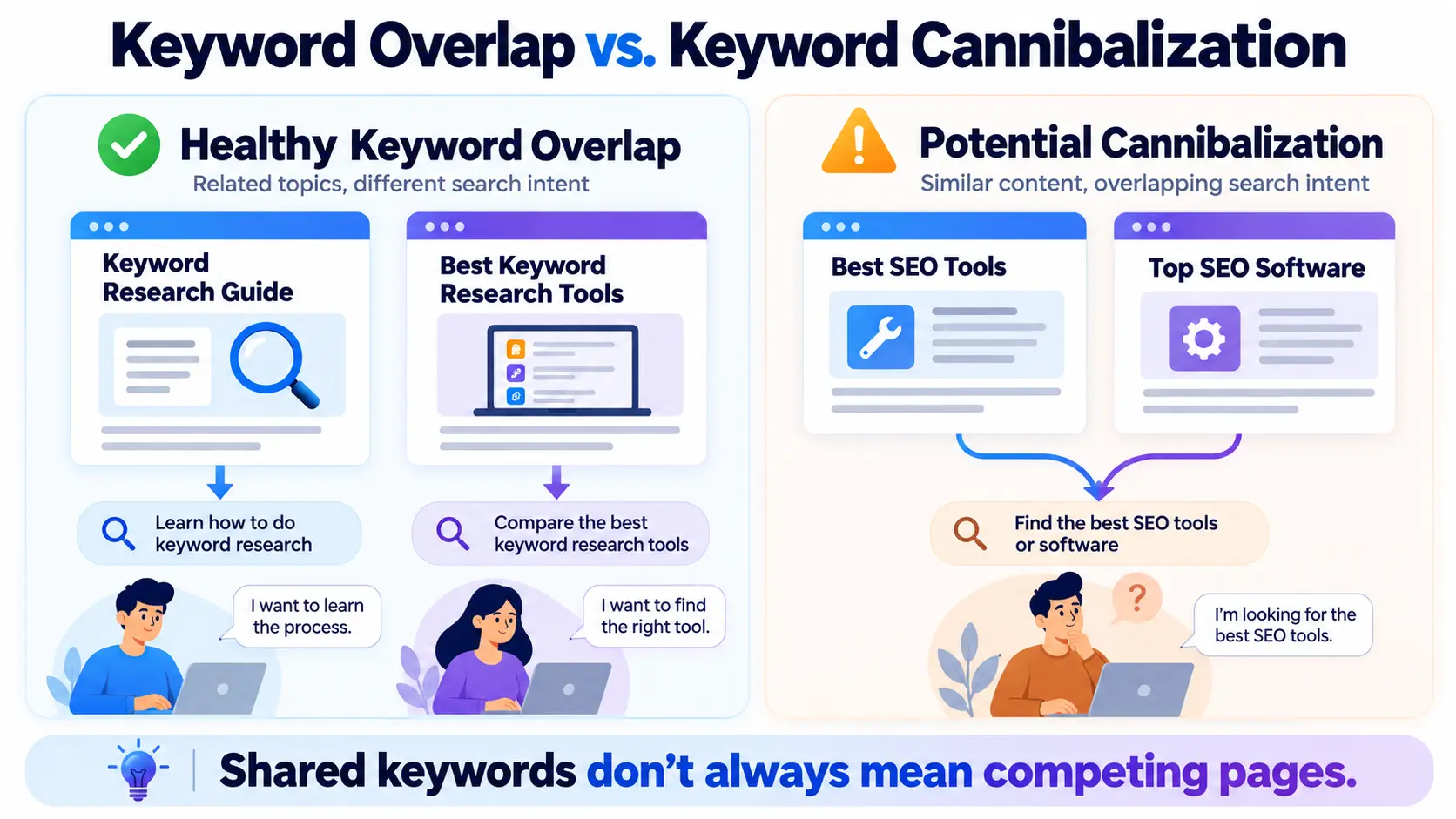
Keyword cannibalization happens when two or more pages on the same website overlap so heavily in their target topic and search intent that they may interfere with a clear content strategy or compete for the same search opportunities.
Consider an SEO blog that publishes the following content, for instance:
- Best Keyword Research Tools
- Top Keyword Research Software
- 10 Best Tools for Finding SEO Keywords
All three might contain almost identical recommendations, target the same audience, and answer the same question.
That overlap deserves investigation.
Now consider a different group:
- What Is Keyword Research?
- How to Find Low-Competition Keywords
- Best Keyword Research Tools
These articles are related, but their purposes are different.
The first explains a concept. The second teaches a process. The third helps readers compare software.
They may not need to be combined if they gain impressions for some of the same searches.
The key distinction is search intent, not merely keyword repetition.
Is Keyword Cannibalization a Google Penalty?
No. There is no specific Google spam penalty for keyword cannibalization.
When pages from the same website are relevant, Google may rank them differently for comparable or even identical requests.
The potential problem is usually one of content strategy and search relevance.
For example, heavy overlap can create situations where:
- Two articles provide nearly the same answer.
- Internal links lead to many pages on the same subject in an inconsistent manner.
- An older, less useful page appears for a query better served by a newer guide.
- There is no obvious content explanation why search visibility changes between URLs.
- Several incomplete articles could be consolidated into one more useful resource.
However, seeing two pages in Google Search Console for one keyword does not automatically prove a problem.
Before changing anything, you need to understand what each page contributes.
Common Causes of Keyword Cannibalization
Publishing similar articles without checking existing content
This is common on blogs that publish frequently.
A writer researches a new keyword but forgets that an older article already addresses the same question.
Over time, the site accumulates several guides with overlapping titles, headings, and examples.
Targeting keyword variations as separate topics
Consider these searches:
- how to update old blog posts
- how to refresh SEO content
- SEO content updating guide
They can represent closely related search intent.
Creating separate articles for every variation may lead to repetitive content when one complete tutorial could answer them together.
That doesn’t mean every keyword variation belongs on the same page. The decision depends on the actual search results and what readers expect.
Creating multiple commercial roundups
Software blogs sometimes publish several articles such as “Best SEO Software,” “Top SEO Tools,” and “Best Tools for SEO.”
If the recommendations, reader audience, and decision criteria are almost identical, the pages may be competing for similar searches.
More specialized comparisons—such as keyword clustering tools versus technical site audit tools—are easier to differentiate.
Weak internal linking and unclear page roles
Internal links aid search engines and readers in locating pertinent content.
If several overlapping pages receive similar anchor text and no page clearly addresses the main topic, the website’s structure can become confusing.
Our internal linking strategy guide explains how related articles should connect through useful, descriptive links.
Internal linking alone cannot solve two articles that provide essentially the same answer. The content itself must have a distinct purpose.
How to Find Keyword Cannibalization Using Google Search Console
Google Search Console is a practical starting point because it provides data about your website’s appearance in Google Search.
You can examine search queries, pages, clicks, impressions, click-through rates, and average positions.
The following process does not require a paid SEO subscription.
Step 1: Open the Search Results Performance Report
Sign in to Google Search Console and select your website property.
From the navigation menu, open:
Performance → Search results
Choose a useful date range, such as the last three months.
For an established website, six months may provide more context. If your site receives little traffic, avoid making decisions from just a few days of data.
Enable these metrics:
| Metric | What it tells you |
|---|---|
| Total clicks | How often searchers clicked your website |
| Total impressions | How often your website appeared in search results |
| Average CTR | Clicks divided by impressions |
| Average position | Average ranking position, subject to the report’s aggregation rules |
Don’t treat average position as a fixed ranking. It varies across searches, countries, devices, and time.
Step 2: Find a Query Related to Multiple Articles
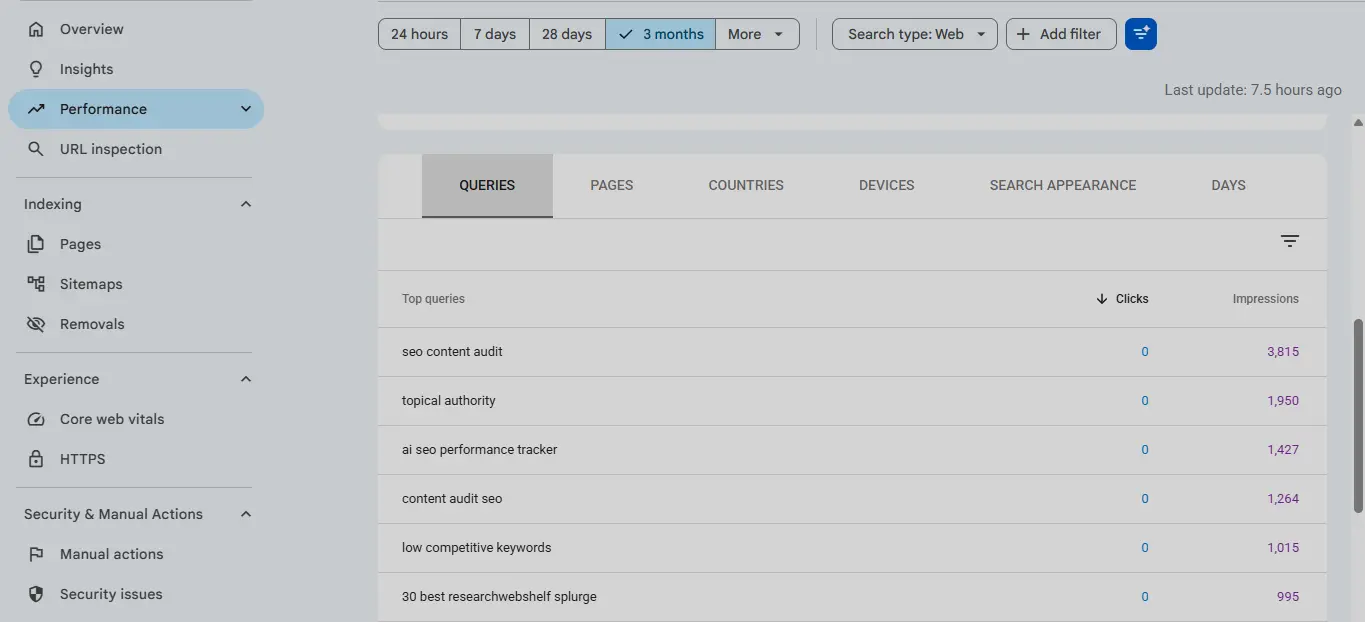
Scroll down to the Queries tab.
Look for searches that relate to topics covered by more than one article on your website.
For example:
best keyword research tools
You might already have a dedicated software comparison and a broader SEO tools article that mentions the same products.
Click that query in the table.
Search Console will apply a filter so you can analyze performance for that particular search.
Alternatively, use Add filter → Query to enter a keyword or a query pattern.
A query containing filter is helpful for investigating groups of related searches, but remember that different query variations may serve different intents.
Step 3: Switch to the Pages Tab
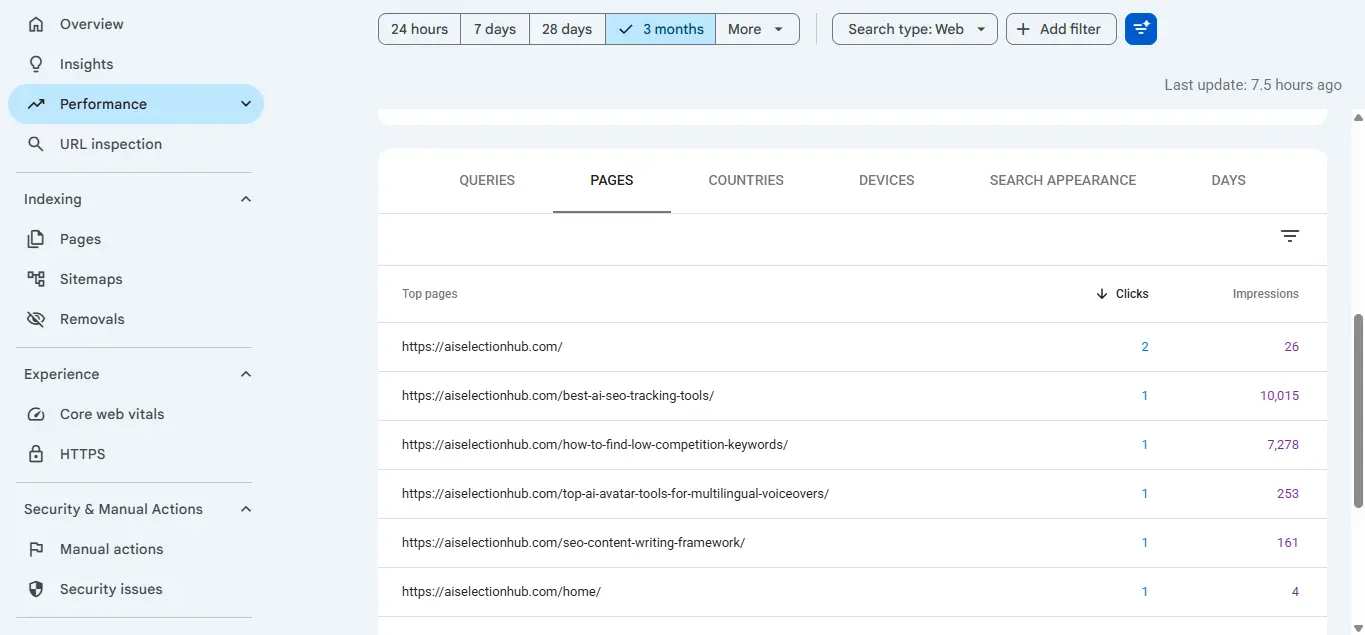
With the query filter active, select the Pages tab.
This is one of the most useful steps in the entire investigation.
You’ll see the URLs that received measurable search impressions or clicks for the selected query.
Suppose the results look like this:
| Page | Impressions | Clicks | Average position |
|---|---|---|---|
/best-keyword-research-tools/ | 620 | 18 | 12.4 |
/top-seo-tools/ | 190 | 2 | 24.1 |
/keyword-research-guide/ | 75 | 1 | 31.6 |
These numbers are fictional and provided only to demonstrate the analysis.
The first page appears more relevant to a tool-comparison query, but the other two also receive impressions.
Does that prove cannibalization?
Not yet.
The broad SEO tools article might briefly discuss keyword research software, while the beginner’s guide might contain a relevant educational section.
Those are legitimate reasons for related pages to appear.
You now have a shortlist of URLs worth examining.
Step 4: Compare the URLs Over Time
Open the date filter and compare the most recent period with a comparable previous period.
For example:
Last 3 months vs. previous 3 months
Review whether:
- One URL consistently receives most clicks.
- Two URLs alternate in visibility.
- A newer page is gaining impressions while an older page declines.
- Both pages are losing visibility.
- The overall topic is improving even if traffic shifts between URLs.
A switch in visibility is a clue, not proof.
Search behavior, Google updates, content changes, device differences, and seasonality can all affect the data.
For a more controlled comparison, keep the same search type, country, device, and query filters wherever practical.
Step 5: Check Search Intent Manually
Search for the query in Google and review the types of results being shown.
Ask:
- Are searchers looking for a definition, tutorial, tool comparison, or product?
- Which of my articles best answers that need?
- Does each article provide something meaningfully different?
- Would the reader benefit from visiting both pages?
- Are the pages differentiated by audience, use case, or depth?
Also examine the pages themselves.
Compare their introductions, headings, primary examples, and conclusions.
If both articles answer almost exactly the same question for the same audience, you may have a genuine content overlap issue.
If they solve different problems, keeping both may be the better decision.
Step 6: Inspect Important URLs
Use Search Console’s URL Inspection tool to examine each important page.
Check whether the URL is indexed and whether Google has selected the canonical URL you expect.
A duplicate or alternate canonical issue is not the same thing as keyword cannibalization, but it can complicate your analysis.
If Google considers one page a duplicate of another, inspect the content and canonical signals before making editorial changes.
Google’s canonicalization documentation explains how duplicate or very similar URLs can be consolidated.
Step 7: Record Your Findings
Create a simple audit spreadsheet with the following columns:
| Query | Competing URLs | Intent overlap | Evidence | Action |
|---|---|---|---|---|
| best keyword tools | Page A / Page B | High | Similar recommendations | Review for consolidation |
| keyword research basics | Page A / Page C | Low | Different reader needs | Keep separate |
| SEO content updates | Page D / Page E | High | Similar tutorials | Differentiate or merge |
Do not mark a page for deletion just because its impressions or rankings are low.
The purpose of the spreadsheet is to help you make consistent, evidence-based decisions.
How to Confirm Whether Cannibalization Is Actually Hurting SEO
Finding overlapping URLs is the beginning of the investigation—not the end.
Use three tests before deciding whether to make changes.
Test 1: Does the search intent genuinely overlap?
This is the most important test.
Two pages that solve different problems can remain separate even when they share keywords.
Two pages with different titles but nearly identical advice are more likely to need consolidation.
Test 2: Is there evidence of a practical problem?
Look for meaningful patterns such as an outdated article attracting the wrong audience, important content being difficult to find, or pages covering the same topic without adding distinct value.
Repeated ranking fluctuations alone aren’t sufficient evidence.
Test 3: Would combining the pages improve the user experience?
Imagine a visitor landing on either article.
Would they get a complete answer?
Would combining the content make it clearer, more accurate, and easier to navigate?
Or would the merged article become an unnecessarily long guide covering several different intents?
If the merged result would be less helpful, the pages probably shouldn’t be combined.
How to Fix Keyword Cannibalization
There is no single fix for every situation.
The correct action depends on whether the pages have distinct intent, useful content, rankings, backlinks, and a suitable destination for consolidation.
Fix 1: Keep Both Pages and Make Their Purposes Clearer
This is appropriate when two articles serve different search intents but their positioning is too similar.
For example:
Page A: Best Keyword Research Tools
Page B: How to Perform Keyword Research for a Blog
The first is a software comparison. The second teaches a process.
You might improve Page B’s introduction and headings to emphasize its step-by-step workflow rather than trying to make it rank primarily as a tool roundup.
Then connect the two pages naturally.
Someone learning how to research keywords may eventually need a keyword research tool comparison.
This provides a useful reader journey without collapsing two different purposes into one article.
Fix 2: Update the Stronger Article
Sometimes one article already satisfies the search intent more effectively.
The second article adds little distinct value, but it contains a few useful examples or explanations.
In this case, improve the stronger article first.
You might add:
- Missing explanations and practical examples
- Updated screenshots
- Better comparisons
- Answers to related questions
- Clearer headings
- Relevant internal links
A comprehensive SEO content audit can help you identify which page should receive your attention.
The goal is not simply to add words. It is to make the preferred article the most useful answer for that search intent.
Fix 3: Merge Two Articles Into One Stronger Resource
Merging makes sense when two articles have substantial intent overlap and both contain useful information.
Imagine publishing:
- How to Fix Keyword Cannibalization
- Keyword Cannibalization SEO Guide
If both cover the same causes, detection steps, and solutions for the same audience, maintaining them separately may not be worthwhile.
A careful consolidation process would look like this:
- Review both pages’ Search Console performance.
- Check backlinks and referral traffic.
- Choose the most appropriate permanent URL.
- Combine genuinely useful information into a cohesive article.
- Remove duplicated explanations.
- Publish and quality-check the consolidated page.
- Permanently redirect the retired URL to the relevant surviving page.
- Update internal links and sitemap references.
- Monitor indexing and search performance.
Do not assume the URL with the highest word count should survive.
Consider relevance, usefulness, backlinks, historical performance, and the URL’s suitability for the topic.
For broader content consolidation decisions, see our SEO content pruning guide.
Fix 4: Use a 301 Redirect When a Page Is Permanently Replaced
A 301 redirect tells browsers and search engines that a URL has moved permanently.
If you merge two overlapping articles and retire one URL, redirecting the old address to the surviving article is often appropriate.
For example:
example.com/keyword-cannibalization-tips/
permanently redirects to:
example.com/keyword-cannibalization-guide/
The destination should genuinely satisfy the original page’s purpose.
Avoid redirecting unrelated deleted articles to your homepage simply to avoid showing a 404 error.
After implementing the redirect, test that it works and update internal links to point directly to the destination.
A permanent redirect is a strong canonicalization signal, but search visibility is not guaranteed to transfer exactly as it was.
Fix 5: Use Canonical Tags Only When Appropriate
Canonical tags help communicate the preferred URL among duplicate or very similar pages.
They are useful for genuine URL duplication, such as alternate URLs showing substantially the same content.
However, a canonical tag is not a general-purpose fix for two different articles that happen to target related keywords.
If both pages have different content and deserve to exist, pointing one canonical tag to the other may be inappropriate.
If one article permanently replaces another, a suitable permanent redirect is generally clearer than leaving the retired page accessible with a canonical tag.
Google also treats canonical tags as signals rather than absolute commands.
Fix 6: Delete Only When No Suitable Replacement Exists
Some obsolete pages genuinely don’t deserve to remain published.
Before deleting one, check whether it receives traffic, has valuable backlinks, or answers a useful question.
If a relevant replacement exists, consider consolidation and redirection.
If there is no appropriate replacement and the content is permanently removed, a proper 404 or 410 response may be appropriate.
Don’t automatically redirect every deleted page to an unrelated URL.
Which Fix Should You Choose?
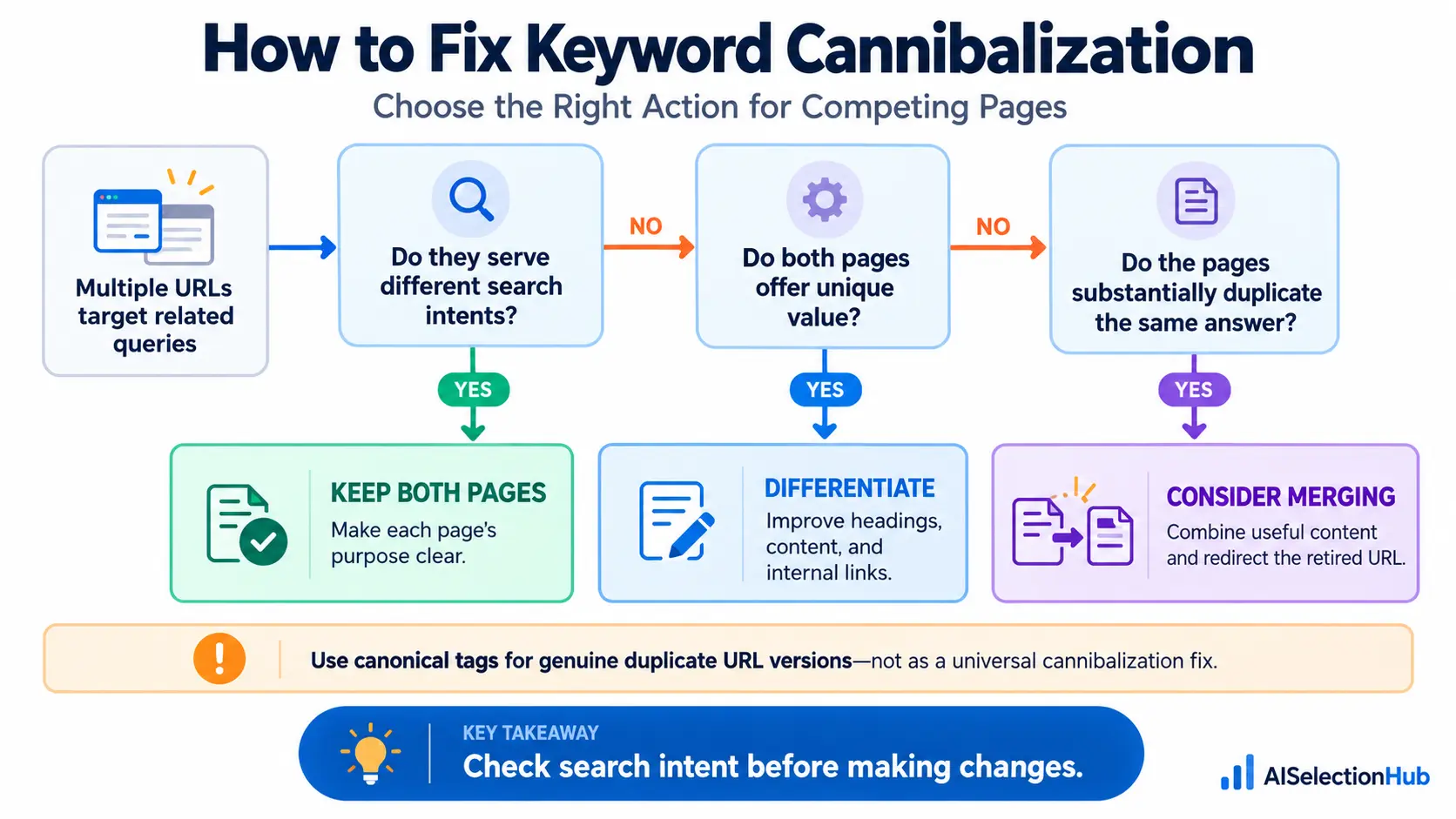
Use this decision framework:
| Situation | Recommended action |
|---|---|
| Same query, different search intent | Keep both pages |
| Similar topic, unclear page positioning | Differentiate titles, headings, and content |
| One strong article, one incomplete overlapping article | Improve the stronger page; evaluate consolidation |
| Two pages with almost identical purpose | Consider merging |
| Retired page has a relevant permanent replacement | Use a permanent redirect |
| Duplicate or alternative URLs show essentially the same content | Review canonicalization |
| Obsolete page with no useful replacement | Consider removal with a proper HTTP status |
The safest approach is to confirm the actual problem before choosing a fix.
A Practical Keyword Cannibalization Example
Let’s use a fictional SEO blog.
The site has three articles:
Article A: Best SEO Tools for Beginners
Article B: Best SEO Software for Small Businesses
Article C: What Are SEO Tools and Why Do You Need Them?
Search Console shows impressions for all three pages under the broad query “SEO tools.”
At first, the owner assumes the three articles are cannibalizing one another.
But a closer review reveals that Article A helps beginners compare accessible software, Article B discusses business requirements and budgets, and Article C explains basic concepts.
The articles have different purposes.
Deleting two of them could remove genuinely useful coverage.
Instead, the owner could:
- Make each article’s audience clearer.
- Remove repetitive explanations.
- Add distinct examples and comparisons.
- Link between the articles where useful.
- Monitor which pages appear for more specific searches.
Now suppose Articles A and B contain essentially the same tools, prices, recommendations, and advice without meaningful audience differences.
That would justify a closer look at merging or substantially differentiating them.
The lesson is simple:
Don’t make consolidation decisions based on a shared keyword alone.
How to Prevent Keyword Cannibalization Before Publishing
Fixing overlap after publication takes time.
Preventing unnecessary duplication is usually easier.
Maintain a Keyword-to-URL Map
Before writing a new article, review your existing content.
Record its primary topic, target search intent, audience, and URL.
For example:
| Main topic | Existing article | Intent |
|---|---|---|
| Keyword research basics | Beginner’s keyword research guide | Educational |
| Low-competition keywords | How-to tutorial | Problem solving |
| Keyword research tools | Software comparison | Commercial |
Before creating a new page, ask whether it solves a distinct problem or simply repeats an existing one.
Review Search Results Before Writing
Search your proposed topic and inspect the types of results appearing.
A keyword variation doesn’t always justify a separate article.
If several target queries clearly share the same intent, consider covering them together.
If the results show distinct expectations, separate content may be appropriate.
Plan Topic Clusters Carefully
Related content is valuable when every article has a purpose.
A broader guide can introduce a topic, while supporting pages cover more specific workflows.
This connects closely to building topical authority through useful, related content.
But topic clusters should not become an excuse to publish five variations of the same article.
Update Existing Content Before Creating Duplicate Guides
If an older article already answers most of a proposed topic, consider improving it instead.
Updating can involve new screenshots, clearer instructions, better examples, or additional sections.
New URLs aren’t necessary for every new keyword variation.
Review Internal Links
Use descriptive, natural anchor text that accurately reflects the destination.
When one page serves as the main guide for a topic, make it reasonably easy to reach from related articles.
Avoid repeatedly sending readers to several near-identical pages without explaining their differences.
How Long Does It Take to See Results After Fixing Cannibalization?
There is no guaranteed recovery timeline.
A small content adjustment may be reflected after Google recrawls a page.
A redirect, consolidation, or canonical change may require further crawling and reevaluation.
Performance can also change because of competition, seasonality, search intent, and ranking system updates.
For important changes, record a baseline before editing.
Then review Search Console at reasonable intervals, such as after two weeks, one month, and two to three months, depending on how frequently the site receives impressions.
Track:
- Organic clicks and impressions for the relevant query group
- Performance of the preferred URL
- Combined performance of the pages involved
- Indexing and canonical status
- Referral traffic and conversions where relevant
Don’t declare success because one page’s ranking improved for a day.
Likewise, don’t declare failure because a changed page takes time to settle.
The objective is better coverage of the intended search demand—not simply making one URL disappear from a report.
Keyword Cannibalization Audit Checklist
Use this checklist before making changes to competing pages:
Identify the search query or query group.
Filter that query in Google Search Console.
Review the Pages tab.
Compare performance across meaningful periods.
Check whether the pages answer the same search intent.
Inspect the content, titles, and headings.
Review important backlinks and internal links.
Check indexing and canonical signals.
Decide whether to keep, differentiate, improve, merge, or retire.
Implement redirects only where appropriate.
Update internal links after consolidation.
Measure combined query and page performance afterward.
Remember that Search Console does not expose every search query. Anonymized queries and reporting limitations mean its data is useful evidence, not a complete record of every search where your pages appeared.
Frequently Asked Questions
Can two pages on the same website rank for the same keyword?
Yes. Two pages can appear for the same or similar queries if Google considers both relevant. It becomes a concern when they unnecessarily duplicate search intent or create a confusing content experience.
Can Google Search Console detect keyword cannibalization?
Google Search Console can reveal queries associated with multiple URLs and help you compare their performance. It does not provide a dedicated keyword cannibalization diagnosis, so you must interpret the data.
Does keyword cannibalization always hurt rankings?
No. Shared keyword visibility does not automatically indicate harm. The important questions are whether the pages overlap in intent and whether maintaining both is useful.
Should I merge every article targeting similar keywords?
No. Merge only when substantial content and intent overlap make consolidation more useful than keeping separate pages. Related topics can legitimately support multiple distinct articles.
Is a 301 redirect better than a canonical tag?
They serve different purposes. A permanent redirect is generally appropriate when one URL is retired and replaced. Canonical tags are primarily used to indicate preferred URLs among duplicate or very similar pages that remain accessible.
Final Thoughts
Keyword cannibalization isn’t solved by deleting every article that shares a keyword with another page.
The real task is understanding what each page contributes.
Start with Google Search Console. Examine the queries and URLs, compare performance over time, and determine whether the content serves distinct search intents.
Keep useful pages that solve different problems. Improve articles that lack clarity. Consolidate content when two pages unnecessarily answer the same question.
Most importantly, document your decisions and measure the results rather than assuming every ranking fluctuation is caused by cannibalization.
A successful SEO content strategy is not about giving every keyword its own page.
It’s about giving every important search intent the most useful answer.
Official sources and further reading