Google Search is not a list of blue links anymore.
When someone looks for advice about SEO or software or home improvement or business management they might see an AI-generated summary first. This summary gives information. Includes links to other sources.
This change affects people who read the results and also the people who write the articles.
An article that is helpful could show up as a link, in the AI summary. Another article might show up in search results but not get as many clicks as it should. Some searches don’t even show an AI summary all.
If you’re trying to understand how to optimize content for Google AI Overviews, the first thing to know is that there isn’t a formula that guarantees inclusion.
Googles guidance emphasizes useful content and established SEO best practices. Clear page structure, accurate information, technical accessibility and genuine expertise remain important.
The opportunity is to make your content worth discovering, understanding, referencing and visiting.
This guide explains how to optimize content for Google AI Overviews without relying on hacks. You’ll learn a content framework, how to strengthen credibility, how to approach Generative Engine Optimization for small business websites and how to measure performance, with Google Search Console.
You’ll also find an AI Overview optimization checklist, common mistakes to avoid and a 30-day implementation plan.
What Are Google AI Overviews?
Google AI Overviews are summaries created by intelligence that can show up in Google Search results. These summaries are provided when Googles systems think they will be helpful to users.
The goal of these overviews is to help people learn about a topic look into a question or get started on more research.
An overview might have links that let users go to websites for information.
For instance, someone looking up:
“How should a small business improve its website’s SEO without hiring an agency?”
might get a response that talks about the basics of SEO, the details of the business, good content and how to appear in searches.
A full article about small-business SEO could be one of the sources shown with that answer.
That doesn’t mean Google will cite every relevant article.
Google decides when AI Overviews show up what information is helpful and which supporting links to include.
AI Overviews are different from AI Mode, another Google Search feature meant for more conversational exploration. They are features, but their designs and the sources they show can be different.
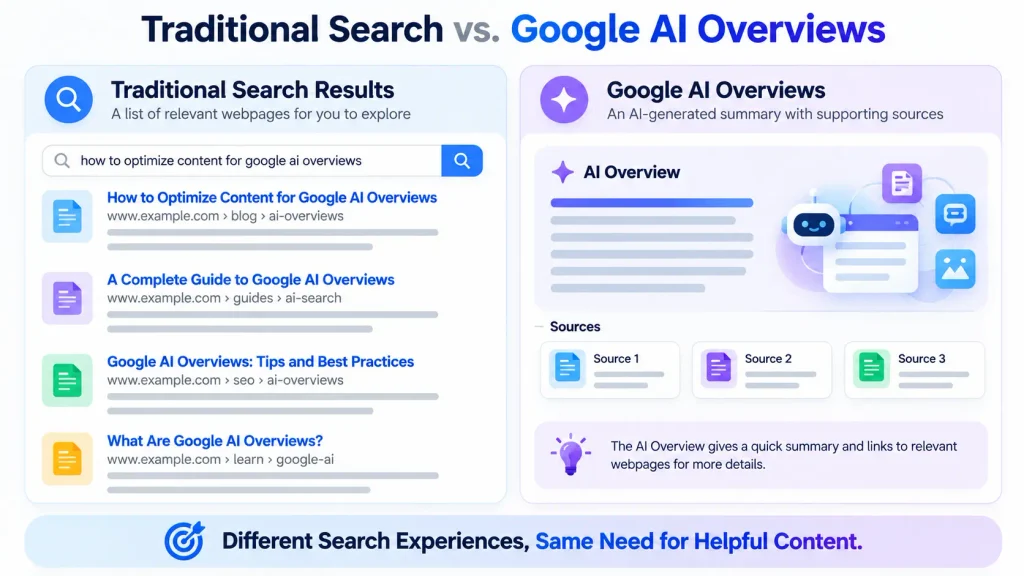
How are AI Overviews different from traditional search results?
Traditional organic results mainly help people decide which pages to look at.
AI Overviews can show some information on the results page before someone clicks on a link.
This changes the way publishers need to think about what they offer.
A simple answer might be given without needing someone to go to a website. A detailed explanation, a comparison, a helpful template, an original set of data or a complicated process might make someone want to see the full version.
The real meaning is important:
Don’t just give information that’s already easy to find. Give something enough that people might want to read the whole thing.
How Google AI Overviews Find and Use Content
Before deciding how to optimize content for Google AI Overviews, it helps to understand the foundations.
According to Google’s official guidance, Google’s generative AI search experiences use the same systems and technologies as Google Search including Retrieval Augmented Generation (RAG).
At a high level, this means that AI can use the information retrieved to answer.
Google can look at similar searches and sources using systems to better understand different aspects of the question.
This doesn’t mean that the AI Overview will read every page in your index or that there is a set process.
The systems are quite complex and Google isn’t giving away their complete formula for choosing what sources to use.
However, there are things that you can control as a website owner.
- Is important content crawlable?
- Is the page able to be indexed?
- Is there useful information in a readable format?
- Does the article meet the needs of the search?
- Are the claims accurate and backed up?
- Is there any real added value to the article beyond generic explanations?
- Can the reader move between related resources?
These aren’t exclusive factors to AI Overviews but are good SEO basics which will also affect AI search experiences.
Can a page appear in an AI Overview without ranking first?
AI Overview links are not a copy of the top-ranking results.
You might find different relevant sources for some parts of your query based on Google’s AI experiences.
But ranking and overall search quality still matter.
We still need to ensure a page meets Google’s technical requirements and is appropriate to show in Search with a snippet.
There is no guarantee a page will be shown in the AI Overview sources from Google’s index.
The correct conclusion isn’t “ranking no longer matters”.
The visibility could be from multiple Search experiences and publishers should ensure they have a strong foundation to work from rather than trying to utilise a so-called ‘AI shortcut’.
Why Traditional SEO Still Matters in AI Search
A common misconception is that Google AI Overviews mean traditional SEO is dead.
But no.
If your site has poor content, pages that are difficult to access, confusing navigation and incorrect information then just using trendy AI optimization keywords won’t help.
Google state in their guidance for 2026 that traditional SEO remains important.
For smaller websites this means keeping things simple and focusing on the basics.
Technical accessibility
Ensure your key pages are crawlable and indexable.
If your tutorial isn’t well written it may not be picked up as a supporting link by Google.
Check robots.txt, page level indexability, server responses and any hosting/CDN limitations.
Useful content
Every article should answer a question a user would ask.
If your page is very generic and offers no new examples or useful analysis then there may be little reason to pick it over better resources.
Internal linking
A logical internal linking strategy will help your users find the right information and provide useful connections for search engines.
If you’re working on a WordPress site our internal linking strategy help will show you how to help your related articles.
Content readability
Using readable fonts, helpful navigation, mobile friendly design and good page speed will make your content easier to read.
Your page should be easy to use whether users have arrived from an AI overview, search results, social media or direct.
Trust
Users need to know who is responsible for the content and if they can trust any key claims.
This is particularly important if your article will influence any purchasing, financial, health or other important decisions.
The best AI search strategy starts with having a useful website.
Step 1: Know The Search Intent
The first real step to optimising your content for Google AI Overviews is to identify the right search query to target.
A common mistake made by editors is to write an entire 2,000 word article around a keyword.
This often results in a piece of content that includes the keyword but fails to address the real question.
For example, the following queries may fall under the same general topic but have different intents:
What are Google AI Overviews?
How can I optimise my blog for Google AI Overviews?
Why has my website lost clicks since AI Overviews were introduced?
How can I track my visibility in Search Console for AI Overviews?
The first query is informational, the second requires actionable steps, the third is a problem solving query and the fourth is asking for help with the reporting. If you put all of this into one generic article, you may not really be addressing any of the queries well.
Mapping Out The Search Intent
Before writing, note down:
Research Question
Example Answer
What do they need?
Actionable steps to improve visibility in AI Search
What do they know?
Basic SEO knowledge
What do they want?
To improve quality content and track visibility.
What information is missing?
Current Google guidance and realistic examples.
What format would be best?
Tutorial, checklist, examples and screenshots.
Reviewing Current Search Results
Look at what type of pages are appearing, how in-depth the answers are and what questions they are answering.
Don’t necessarily follow the same format.
Look to identify what questions aren’t being answered, if the information is outdated and what unique value you can add.
Think Beyond The Keyword
When someone is searching for how to optimise content for Google AI Overviews, they may also want to know about how to build trust as an author, how to research queries, schema, images, how to track in Search Console and how to use AI Overviews for small businesses.
These are all related topics and should be included to help the user achieve their goal.
Don’t add extra information just to increase the word count.
Step 2: Give Clear Answers
One of the easiest ways to optimise your content for Google AI Overviews is to provide clear answers to important points.
This doesn’t mean every paragraph should be in a Q&A format.
But to reduce any friction between the question and answer.
Poor Answer:
AI Overviews are changing the digital landscape. Businesses should embrace the future of AI to stay competitive.
This answer is impressive but provides little information.
Better Answer:
Make sure your important pages are indexable, answer the question accurately, include unique evidence and make it easy to find useful information to improve your content for Google AI Overviews.
This provides the user with an answer. The rest of the article can go into detail on why and how.
Give Direct Answers
If a section asks “Do I need special schema for AI Overviews?”, give a direct answer.
Follow this with an explanation.
For example:
No. Google don’t require a specific schema type for AI Overviews. Just make sure you’re using the correct structured data accurately.
This will be more useful than writing 3 paragraphs explaining what structured data is.
Use Helpful Formatting
Use tables to compare features.
Use numbered lists for actual processes.
Keep paragraphs short for mobile users.
Use subheadings to make long guides easier to read.
However, there are no official guidelines from Google on how many bullet points, paragraph lengths or content blocks you should use to appear in AI Overviews.
Focus on making your content user friendly.
Step 3: Include Unique Information That Can’t Be Easily Found In Generic Articles
This is one of the most important steps to learning how to optimise your content for Google AI Overviews.
Many websites now have generic articles that provide a summary of the same free advice.
They have similar headings, definitions and almost identical conclusions. If you’re just paraphrasing information from elsewhere, there’s not much unique value to gain.
Unique information doesn’t always require a large scientific study.
As a blogger or small business owner you can include unique information by doing the work.
Example 1: Provide a Real Process
Instead of saying:
Use Google Search Console to improve your website.
Give the exact steps.
Walk them through which report to look at, what metrics to compare, how to understand the results and any limitations.
Including a real screenshot will make the tutorial easier to follow.
Example 2: Provide A Comparison
Instead of just listing 5 SEO tools and saying they’re the best, explain:
What they do.
Who they are for.
What the main limitations are.
What the current pricing includes.
What features I personally tested.
What conclusions I’ve drawn from the documentation.
Often people will appreciate knowing the trade-offs.
Example 3: Provide a Resource
A checklist, audit spreadsheet or editorial plan will give the user something useful.
It can also encourage other publishers to link to your resource if it’s relevant.
Example 4: Be Honest With The Results
You don’t need to show massive growth in a case study.
If you’ve updated an old article, improved the heading structure and added new screenshots. After a few weeks compare the results.
If you’ve seen an improvement in impressions but no change to clicks, this is still useful information. Just be careful how you interpret the results.
Explain what’s changed, what hasn’t changed and what other factors may have impacted.
Don’t make up that you’ve seen 300% more traffic to make your article sound more convincing.
Lessons Learned From Common Mistakes
A common mistake is to use phrases like expert tips without actually providing any expert insight.
Or saying something has been tested and compared without explaining how.
This can reduce trust with the user. An experienced editor will remove any claims you can’t back up and provide useful evidence instead of vague advice.

Step 4: Improve Experience, Expertise, Authoritativeness and Trust
When planning how to optimize content for Google AI Overviews, pay particular attention to the credibility of your information.
Google’s people-first content guidelines talk about E-E-A-T.
E-E-A-T can help provide a description of what makes content trustworthy. It is not a simple metric that you can improve on your website.
Trust is important.
Be transparent with authorship
If your article is providing technical advice, then it should be clear who is responsible.
Author bios can provide a description of the skills, experience, editorial, and professional background.
However, if you are not an SEO expert with 8 years’ experience then do not pretend you are.
It is better to be honest with the reader about what you have done than lie about your expertise.
Showcase your expertise
Author bios are not enough.
You should showcase the thinking within your article.
For example, if you are providing technical SEO guidance you could;
Provide accurate information about indexing limitations.
Highlight what is advised vs what is required.
Show the right report within Google Search Console.
Outline why it may not be suitable.
Highlight any risky changes.
Reference official documentation.
Check for up-to-date information
Google’s AI search features, Search Console reports and supported search experiences are all constantly changing.
Software subscriptions are constantly changing in cost.
If you are mentioning any features within your article, ensure they are present.
Use a meaningful date to show the content has been updated with significant changes.
Use trusted sources
If you are providing guidance on Google’s systems then ensure you are referencing official documentation.
If you are comparing companies then try to reference both official documentation and independent, verifiable evidence. Try to include real testing.
If you are using a case study for a small business then ensure you are explaining the situation.
Be factual vs providing advice
For example;
Official: All links provided within Google’s AI search features need to meet Google’s eligibility criteria.
Advice: Provide a clear explanation at the start of your article.
Both can be useful but are different.
The second piece of advice is advice and not a specific requirement from Google.
Step 5: Improve Topic Coverage with Useful Internal Links
Whilst one article may answer one question, often users will want related information.
Suppose your primary guide explains how to optimize content for Google AI Overviews.
Having a good internal linking strategy can help.
If you have a main guide on how to optimise your content for Google AI Overviews then you may want to provide related articles such as;
SEO content audits.
On-page SEO.
Search intent research.
Internal linking.
Topic clusters.
Google Search Console reports.
Content refreshing.
Small business SEO processes.
Each article should have its own purpose.
Your main guide can provide an overview of the process whilst the supporting articles can provide more detailed guidance.
Avoid similar articles
One of the easiest ways to reduce the strength of your content strategy is to have multiple pages for different variations of the same question.
For example;
How to optimise for AI Overviews.
Google AI Overview SEO Optimisation.
How to rank in AI Overviews.
Optimising content for AI generated search summaries.
These phrases may have a lot of overlapping search intent.
This does not mean they should all be on the same page but it is worth looking into what the purpose of each is.
If the reader would expect a similar answer then it may be more useful to have one well-developed article.
For guidance on how to plan your content, see our guide on building topical authority.
You can also perform a structured SEO content audit to find any overlapping, low performing or out-of-date articles.
Provide useful links
Ensure links to other articles are useful.
For example, if you are talking about how your content should match search intent then providing a link to a helpful on-page optimisation tutorial makes sense.
This is why our on-page SEO strategy guide is a good companion article.
Try not to add random internal links just to hit a target score within an SEO plugin.
Having a clear internal linking strategy will help improve the whole of your website.
Step 6: Ensure Key Information is Indexable
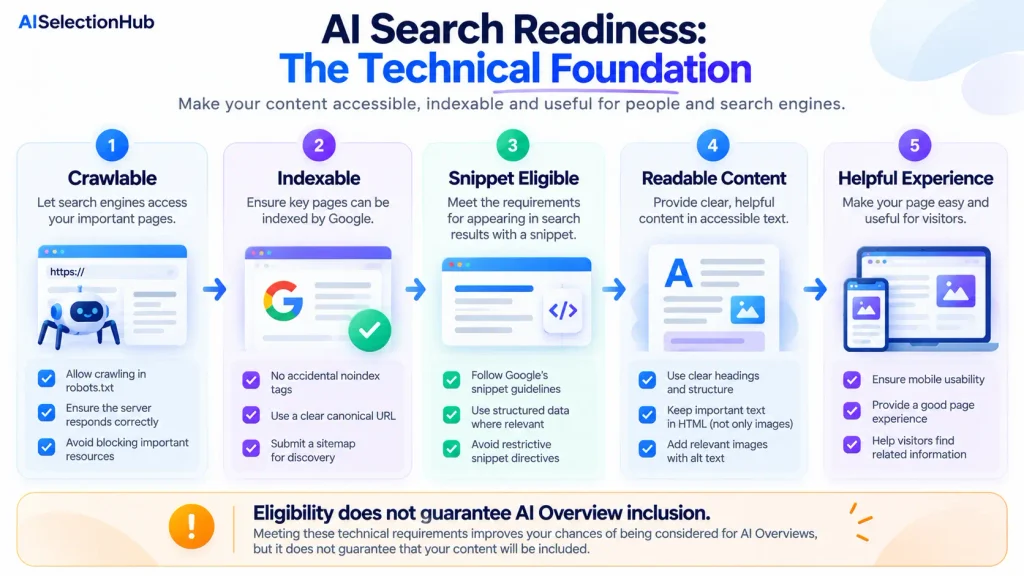
No matter how great your article is, if it does not meet the eligibility criteria it will not show up as a supporting link within Google’s AI search features.
If you’re serious about how to optimize content for Google AI Overviews, check your technical foundation before spending time on more advanced content experiments.
Check the page can be crawled by Google
Check there are no accidental restrictions within your robots.txt or hosting.
Sometimes security and CDN settings can cause issues with legitimate crawlers.
Not all URLs will be blocked but if the information is important and public then it should be accessible.
Check it is indexed
Use the URL Inspection tool within Google Search Console to check your key URLs.
Check they are being indexed and that Google is using the canonical URL you expect.
Submitting a sitemap can help but does not guarantee they will be indexed.
Check it can show within a snippet
Google state that “Supporting links in AI Overviews or AI Mode must be eligible to show in Search with a snippet”.
This is important.
Whilst the page may be present on the internet, it may not be accessible due to indexing / snippet settings.
Check there are no restrictive meta robots directives.
Ensure important text is readable
If you have important instructions within an image then users with assistive technology may struggle to access them.
Having important information within the text of the page can help search systems.
Do not use images to explain everything.
Check your structured data
Structured data can help Google understand what content is eligible. It can help with relevant search features.
There is no special schema for AI Overviews to guarantee it will show.
Only add relevant Article, Breadcrumb, Organisation or other supported schema.
Ensure the data matches what is on the page.
Do not include false reviews or misleading structured data.
Check it is mobile friendly
Open the page on your smartphone.
Check the headings are not wrapping, diagrams are easy to understand, tables are easy to use and important buttons are easy to click.
Step 7: Use Structured Data
One question I often get is about structured data. Do you get a direct benefit from structured data?
Unfortunately the answer is not.
Google does not ask you to use any particular schema to rank in the AI Overviews or AI Mode.
However, structured data can still be used if you’re using the right schema for your content. This will then qualify your page for the supported features within search.
For example,
BlogPosting or Article schema on an article page.
BreadcrumbList schema on a navigation breadcrumb.
Organization or Local Business schema for business pages.
However, creating a fake GEO schema, adding FAQ to every paragraph or adding un-supported ratings to your schema is not a valid optimisation.
FAQ Schema?
Adding FAQ sections to your page can improve the usability of your article. However, you shouldn’t expect to rank in an AI Overview because you’ve added FAQ structured data.
Google have only shown FAQ rich results in supported situations. Adding FAQ schema will not guarantee you enhanced results.
llms.txt?
Some publishers play around with AI text files. However, Google do not currently ask you to create an individual text file for your Search AI features (like llms.txt).
You don’t need to pay for a plugin to create one.
On a small site it’s usually better to spend your time improving the indexability of your site, fixing poor articles and adding valuable original content.
Keyword density?
There is no documented benefit to repeating a phrase 30 times. Whilst the phrase how to optimise content for Google AI Overviews should naturally appear throughout your content, if you repeat the exact same words in every heading and paragraph it won’t be as enjoyable to read.
Use variations, clear explanations and relevant topics to support your content. The aim is to show your knowledge, not reach a certain keyword density.
Step 8: Add Visual Content
Images and videos aren’t just for decoration. A great diagram can explain a complex process quicker than several paragraphs of text. Using a real screenshot can tell your readers exactly where to click. A short demo can help someone understand how to do something.
Google’s AI search guidelines recommend adding relevant and high quality visual content to support your text.
What images should I use?
There are 4 types of image you could use for this type of article.
Conceptual images – To explain what AI Overviews are and how the supporting links will look in a conceptual search.
Actual Screenshots
Screenshots of Google Search Console reports, URL Inspection reports and any publishing settings.
Flow Diagrams
How research, content creation, technical checks and metrics are connected.
Decision Trees
Help users decide which action to take next.
Don’t use AI generated visuals of interfaces.
If you include performance data from Search Console, use an actual screenshot from your account or label it as an example.
Image SEO
File names
Descriptive alt text.
Images should be compressed so they will load quickly but still be readable.
Responsive designs so that complex diagrams remain readable on mobile.
If your infographic is complex, include a summary of the key points within the article.
The image should help with understanding.
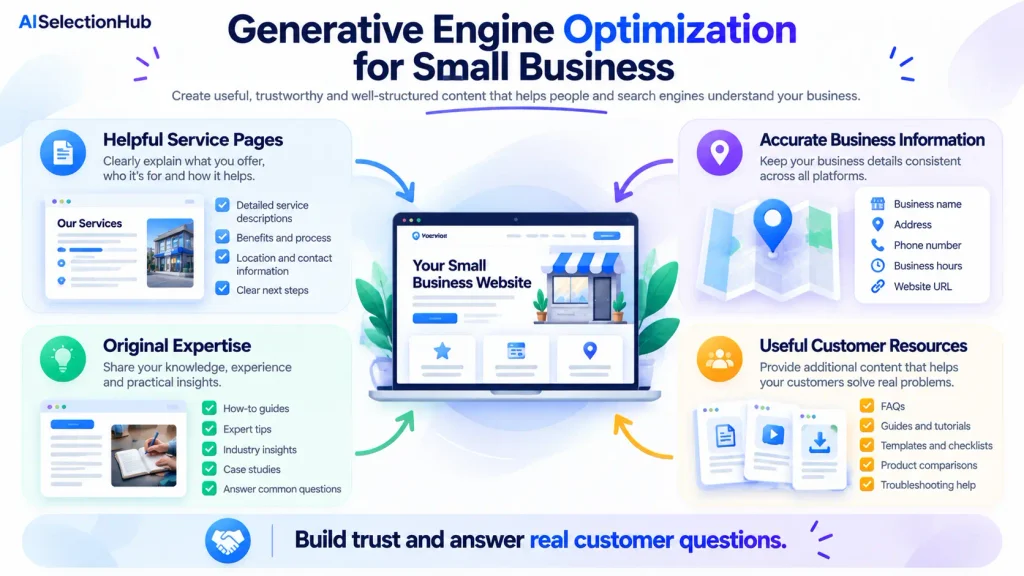
Step 9: Apply Generative Engine Optimization for Small Business
The phrase Generative Engine Optimization for small business describes efforts to make a small company’s information useful, discoverable, and trustworthy in AI-driven search experiences.
This will overlap with regular SEO.
Small businesses typically won’t need a separate tech structure to accommodate AI search.
You need to ensure your information is accurate, your pages are useful, you have good visibility in search and your content helps your customers.
Example – Local Accounting Business
An accounting business that works with small businesses in a certain city could create:
Clear service page
Information on what documents they need for bookkeeping
What common mistakes are made in accounting
How to choose bookkeeping software
FAQs
The service page should include honest information about the businesses qualifications, where they are based, how to contact them and what they do.
Any educational content should be accurate and checked by someone with the right knowledge to give you the advice.
You don’t want to create multiple similar articles about ‘accountant near me’ for surrounding towns.
You want to provide useful information.
Example – Small E-Commerce Business
A retailer selling specialist equipment could create:
Unique product descriptions
Accurate specifications
Comparison tables
Size or compatibility guides
Instructions on how to install
Real images of products
Shipping and returns information
This may answer questions that generic product descriptions don’t.
A comparison using real products will give more value.
Example – Small Digital Marketing Agency
A marketing agency could create:
How to review a Google Business Profile
Common mistakes in local SEO
What to include in a monthly SEO report
How to improve website navigation
Realistic timelines for SEO
They may also want to include anonymised examples of real work they have done with clients (with their permission).
For Generative Engine Optimization for small business owners, credible practical evidence can be more useful than broad statements about “AI-powered growth.”
Accurate Business Information
Ensure your Google Business Profile (if applicable) has accurate information.
Ensure your website has accurate business information.
If you sell products, check the relevant information in Merchant Centre.
This won’t guarantee you will appear in AI Overview but will ensure your information is accurate and useful within the Google ecosystem.
Don’t make up local authority
Don’t make up reviews, office addresses, testimonials, business addresses or client success.
It is very important to be trustworthy when asking visitors to your site to make a purchase/service decision.
Step 10: Create valuable content
One of the difficult questions in how to optimize content for Google AI Overviews is this:
What if Google provides the answer to your simple question?
You won’t be able to control if someone will click through from your page, but you can create valuable content.
A basic article may have a definition for keyword cannibalisation and a few solutions.
However, a better guide would have a walkthrough of Search Console, decision tree, checklist, and examples of when you shouldn’t combine pages.
A summary will provide the general overview but with a full resource you’re giving people a step-by-step guide.
Add depth
Long form content is great for topics that need more depth. However, just having a long article (4000 words) doesn’t mean it will be better than a shorter guide (1200 words). Every section should be adding value. This article will cover:
What the actual AI search looks like
What Google says you need to qualify
Search intent
Evidence
Technical checks
Small business examples
Measuring
Common mistakes
Prioritising
However, adding 500 words saying ‘create high quality content’ won’t help.
Provide downloadable resources
Providing a downloadable checklist or editorial guide will give people a reason to save the page. For example this guide could be paired with an AI Search Content Audit spreadsheet.
Having columns like:
Page
Intent
Indexed
Evidence
AI
Article A
Informational
Yes
Evidence (screenshots)
Check report
Update examples
Article B
Commercial
Yes
Some testing
Check report
Improve comparison
Article C
Tutorial
No
Evidence (detailed steps)
Not qualifying
Check indexing
Will help people take action.
Give clear next steps
A helpful conclusion will tell people what to do next. Rather than just saying ‘AI is the future of SEO’, tell them which pages to look at, what evidence to include and what reports to check. The next steps should be easy to do.
Step 11: Measure your visibility in Google Search Console
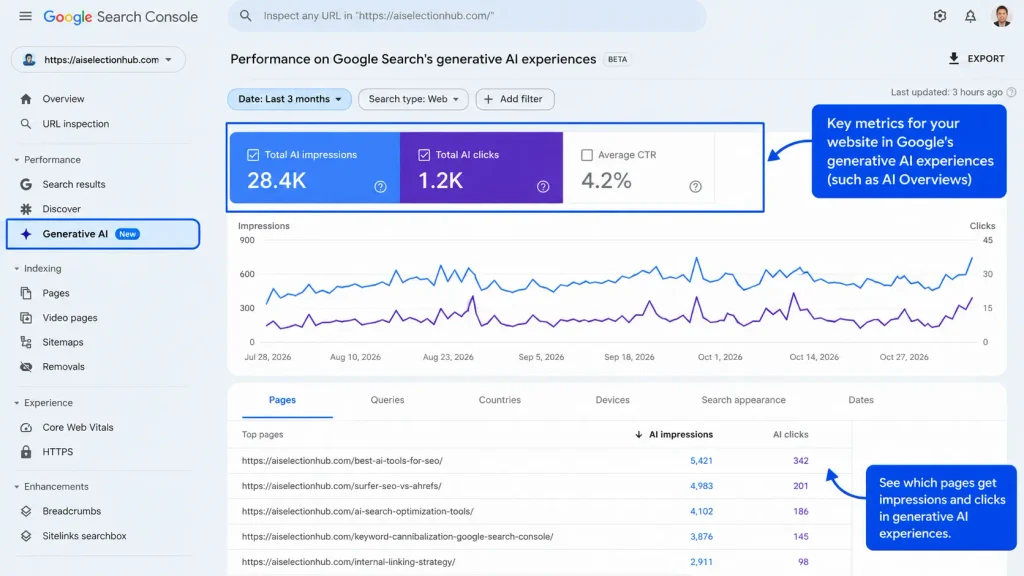
One of the biggest changes in 2026 is the ability to measure your visibility in Google Search Console. They now have a Generative AI performance report. According to their help centre, ‘insights were rolled out to websites globally on August 31, 2026.’
This report shows impressions for supported AI search features (AI Overviews and AI Mode).
This is important for anyone researching how to optimize content for Google AI Overviews because it gives publishers a more direct way to monitor visibility than relying only on screenshots or third-party tracking.
How to view the report
In Google Search Console
Click on your verified website property.
Find your Generative AI performance report under the right performance section.
Look at the impressions and dimensions.
See which pages are showing up most frequently in the supported generative AI features.
Look at trends over the correct time frames.
See why your most visible pages may not be the same as your usual organic traffic leaders.
The report may change over time with different dimensions and metrics. Check Google’s interface and help centre for the latest information. If you can’t see the report, Google state that there may not be enough impressions for generative AI.
This doesn’t necessarily mean your site has technical issues.
What is an AI impression?
According to Google, an impression means that a link to your website was shown to a user in a supported generative AI search feature. However, this doesn’t necessarily mean that they’ve read your article, clicked through or become a customer.
Don’t get too excited about conversions.
Look at your usual search data
You should look at your usual search data to see how you’re performing for AI. For example:
Organic clicks per landing page
Impressions per query group
Average position changes
Engagement on key landing pages
Leads, sales or affiliate conversions
Visitors from relevant locations.
You may be getting impressions from AI search but not many clicks. This doesn’t necessarily mean you’re succeeding or failing. Look at whether you’re getting the right people to see your content and if this is helping to achieve meaningful results.
Don’t get too excited about fluctuations
Search results can vary from person to person, query, device, location and time. You may not see the same AI Overviews in your manual tests as you would later. Just because you have one screenshot showing your site being cited doesn’t mean you’ll consistently be visible. Also, just because you’re not getting one citation doesn’t mean your article has been penalised. Look at trends and evidence per page.
Step 12: Use an AI Overview Optimization Checklist
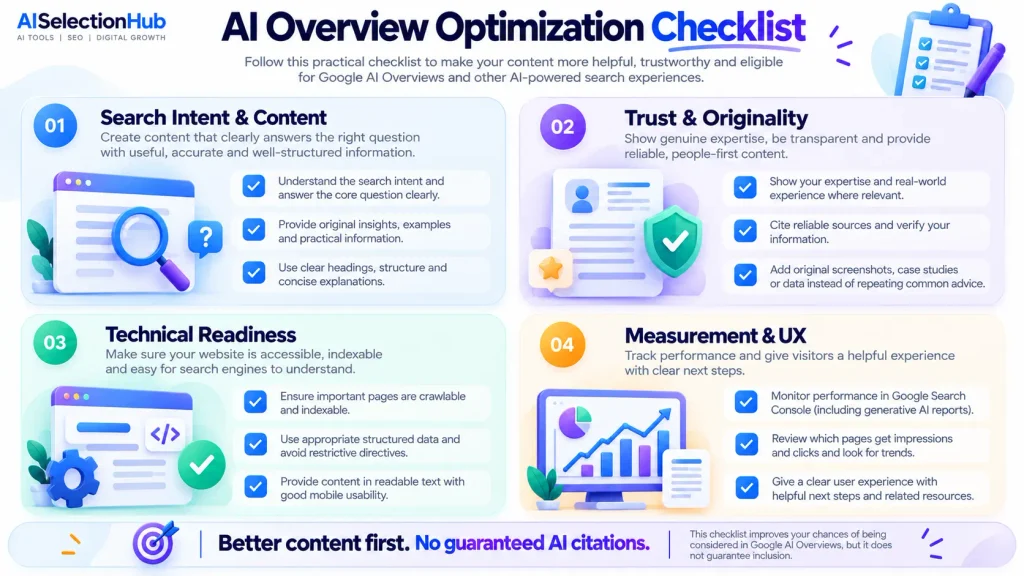
A useful AI Overview optimization checklist should cover both technical eligibility and the quality of the information itself.
Don’t guarantee that ticking all of the boxes means you’ll get an AI citation.
When publishing or updating an article use the following checklist:
Content & Search Intent
The article addresses a specific problem for the reader.
The main search intent is obvious.
The introduction provides useful context.
Key questions are answered clearly and accurately.
Recommendations are explained with examples.
Specific information is included.
Claims are backed up with credible sources.
No duplicate content has been added to boost keyword density.
Trust & Originality
The author and editor can be identified.
Relevant knowledge is shown.
Claims made are backed up with evidence.
Software testing is clearly explained.
Statistics and pricing have been verified.
Sources are acknowledged.
Examples are clearly stated as hypothetical.
The article has been fact checked.
Technical
The key page can be accessed by Google.
The canonical URL can be indexed.
There are no accidental ‘noindex’.
Relevant snippet restrictions have been considered.
All key information can be read.
Internal links are descriptive and crawlable.
Structured data is valid.
Mobile navigation and key page elements work.
Images have been optimised and are easy to understand.
User Experience & Analytics
Headings are descriptive.
Tables and diagrams are used to explain the topic.
The page provides useful next steps.
Links to relevant content.
Key CTAs are aligned to user intent.
Performance is being tracked in Search Console.
Generative AI visibility is being considered (where data is available).
Changes are made based on evidence.
This AI Overview optimization checklist can also function as a regular editorial quality-control process.
Not all optional improvements need to be included on every page.
Focus on correcting any errors that would impact accuracy, usefulness, accessibility or user experience.
Common mistakes to avoid when optimizing for AI Search
Some common mistakes made are quite obvious, however some are more complex and can cause you to waste time and not improve the readers experience.
Common mistakes to avoid:
Republishing similar generic articles.
Having 5 similar guides on how to optimize for AI Overview will not build up good topic authority.
You need to ensure the content is truly varied.
Better: 1 great piece of content, with individual pieces of content only if they are fulfilling different needs.
- Believing that the content will be optimized for AI Search.
AI tools can help create outlines, summaries, organize research and help with editing.
However the content can sometimes be full of inaccuracies, unbacked statements, old information and be repetitive.
Better: Ensure you fact check properly, include your own examples and ensure the final piece has real editorial judgement.
- Using personal experience without evidence.
Statements such as “After 8 years of testing hundreds of websites…” make you sound like an expert.
However if you are making it up it takes away from your credibility.
Better: Talk about real work you have done, show how you have done it and be honest about the limitations.
- Trying to get the perfect plugin score.
You can have a great score in your SEO plugin but the content can be repetitive and not helpful.
AI tools cannot fully determine if your content has real insights, is helpful and accurate.
Better: Use your SEO tools as checks.
- Using bespoke files.
Some services will tell you that you must use bespoke files, bespoke markup or bespoke AI formatting.
Google do not require bespoke AI text files or bespoke markup to be eligible for AI Overview.
Better: Ensure you follow documented technical requirements and treat any bespoke experiments as optional.
- Not checking if the content is being indexed.
Your content can be great however if the URL you want it to appear on is not being indexed.
Better: Ensure your content will be crawled, canonicalized and eligible for snippets before optimizing further.
- Believing that mentions = traffic.
Having a mention in AI Overview does not mean people will click through.
Even if they do it may not result in real engagement.
Better: Monitor how visible your content is and track real business results.
- Using competitor headings.
The content structure may be good for one website however it may not be relevant to your audience or expertise.
Better: Research what your audience need, identify any gaps and include something useful that the competitor pages aren’t.
- Misleading comparisons.
If you are writing about software and you have not tested the tools but are saying you have then your content will not be reliable to help someone make a decision.
Better: Be clear between what you have observed from using the tools and what has been stated in the vendors documentation. Clearly explain how you have judged the tools.
- Expecting instant results.
Search systems can take time to crawl, index, assess and show updated content.
Better: Set a benchmark and look for real trends.
Overall the key takeaway from these mistakes is:
Optimizing for AI Search should be seen as a commitment to providing useful information.
30 Day Plan to Optimise Content for Google AI Overviews
No complete website revamp is required
Focus on a few key pages.
This plan can be used by bloggers, sole traders and small business owners looking to save time.
Week 1 – Audit your content
Identify 5-10 pages which are key to your website.
Choose pages that will be most relevant, useful and potentially profitable.
For each page:
Check:
Who is the target audience?
What is the search intent?
Is the information accurate and complete?
Is it indexed?
Does it contain real unique information?
Do they have useful internal links pointing to them?
Review the standard reports within Google Search Console and Generative AI performance report (if available).
Make a spreadsheet of your starting point.
Week 2 – Optimise best performing pages
Choose 2-3 pages that can be realistically improved.
Don’t try to improve everything.
For each page:
Make the explanations clearer.
Add relevant examples.
Check the sources and any up to date information.
Improve the heading.
Add a useful table, screenshot or checklist.
Update any out of date advice.
Check the internal links.
Ensure the page is mobile friendly.
These are improvements to make the content more useful.
Week 3 – Create supplementary content
Create one piece of content to help improve the ease of use.
This could be:
A content audit template
An SEO checklist
A comparison sheet
A screenshot guide
A small business content planning template
Link it to the relevant guide.
If you create an article to support, make sure it targets a different search intent.
Week 4 – Review your progress
Check that your changes have made a difference.
Have your edited pages been indexed? Have there been any changes to the impressions? Are people engaging with the content?
Try to look for some real insights rather than big conclusions from a small amount of data.
Document:
| Metric | Before | After | Interpretation |
|---|---|---|---|
| Organic impressions | Record baseline | Record current | Visibility trend |
| Organic clicks | Record baseline | Record current | Search traffic |
| AI feature impressions | If available | If available | Generative AI exposure |
| Engagement | Record baseline | Record current | Visitor behavior |
| Conversions | Record baseline | Record current | Business value |
This is simply a guide to measure.
Don’t assume that your project has failed if you don’t see any improvements after 30 days.
Continue to look into your content’s relevance, quality, indexing, competition and data.
How To Optimize Content For Google AI Overviews On A Budget
Small publishers often worry that optimizing for AI search requires expensive tools.
But it doesn’t.
Many of the basics can be done for free.
Google Search Console
Look into what queries you are showing up for, how your pages are performing, indexing and generative AI search impressions.
Google Search
Manual research will give you an insight into what the landscape is currently like and what types of queries readers are asking.
Remember that AI overviews can vary.
Google Analytics
Use analytics to see what people are doing on your landing pages. What are they doing that is valuable?
WordPress
Use your CMS to help organise your pages, improve internal linking, update your content and publish visuals that are relevant.
Spreadsheet
Keep track of what topics you want to target, what current URLs you have, what the search intent is, what date you updated, what evidence you have and how it is performing.
A basic spreadsheet will help avoid unnecessary duplication and keep your content editing process consistent.
Official Free Resources
Google Search Central will give you guidance on indexing, helpful content, technical SEO, structured data and AI Search features.
These are often more reliable than third-parties claiming to help with Google requirements.
The best investment for a small business is always going to be making sure you are doing things carefully.
Generative Engine Optimization can start with one well-kept website and a process for ensuring quality content.
How To Decide What Content To Optimize
You likely won’t need to optimize all of your articles to the same level.
A simple way to prioritize your content is to look at:
Relevance Potential – Does the page answer a question your target audience is asking?
Current Opportunities – Are you getting useful impressions, rankings and engagement from Search Console?
Improvement Potential – Can you add useful evidence or fix clear issues without spending too much?
Prioritize articles that tick all 3 boxes.
For example, updating an old guide that is already getting relevant impressions would be a better starting point than creating a completely new wide-ranging article.
However, if you have a highly relevant tutorial that isn’t getting impressions, you may want to look into the technical aspects and search intent before updating.
Make Sure You Update Meaningfully
Don’t just change the year in your title and say that the content has been updated.
Meaningful updates could include fixing any outdated claims, improving any incomplete sections, adding new examples, improving screenshots or reorganising any confusing information.
Our SEO content pruning guide will help you decide when to update, merge, redirect or delete existing content.
Ensure you make decisions based on what the page is actually doing and what it’s purpose is.
How To Decide On AI Overview Optimization Tools
You may see some tools claiming to help with AI search visibility, GEO, AI Overview tracking or generative search optimization.
Some may be useful but they will vary.
Ask yourself:
What is the tool actually measuring?
Is it measuring AI Overviews, AI Mode, other AI assistants or a combination?
These are all different experiences.
What information can they provide?
Will they tell you where, on what device, how often people are searching and how they are collecting their data?
Are they measuring visibility?
A mention, citation, impression, click and conversion are all different things.
Can you verify the data?
Compare the data to what Google is showing in Search Console.
Are they giving you useful recommendations?
If you can’t use the data to improve your content quality, technical accessibility and search intent then a dashboard won’t be very useful.
Is it right for your site?
If you have a small site with low traffic then investing in expensive AI visibility tools may not be the top priority.
See our SEO reporting tools guide for further information.
Don’t invest in a tool just because it claims to help your content show up in AI Overviews.
No legitimate vendor can guarantee that your sources will be chosen.
FAQs
How do I optimize content for Google AI Overviews in 2026?
Start by ensuring your content is indexable, helpful and answers a clear search intent. Add accurate original information, meaningful examples, relevant links and ensure your page is easy to use. Monitor traditional and generative AI search visibility in Search Console where possible.
Is there a guaranteed way to show up in Google AI Overviews?
No. Google will decide what searches show up as AI Overviews and what sources will be used. Whilst following the guidelines and best practice SEO you may not get picked up.
Does Google require specific schema for AI Overviews?
No. Google doesn’t require a specific schema type for AI Overviews. Ensure you are using the correct structured data where applicable and that it matches what is being shown on your page.
What is the best checklist for AI Overview optimization?
A useful checklist to follow would be ensuring your content has the correct search intent, original information, credible sources, is indexable, eligible for snippets, has internal links, quality visuals, is mobile friendly and is performing well.
What is Generative Engine Optimization for small business?
Generative Engine Optimization for small business means making sure your content and information is useful and can be found in generative search. It is an extension of traditional SEO.
How can I see if my website is showing up in AI Overviews?
Use the Generative AI performance report in Google Search Console. This will show you how many impressions you are getting for supported AI search features from Google including AI Overviews. However, this will only be available if you have enough data. Manually checking will give you examples but won’t be reliable.
Is AI generated content allowed in Google Search?
No content will be automatically rejected for being AI generated. As long as it meets the Search policies and provides accurate original and helpful information then it is fine. However, if you are mass producing low value pages then this may breach spam policies.
How often should I use my focus keyword?
There isn’t a general rule for how often to use keywords for AI Overviews. Use your target phrase where it accurately describes the topic and in the correct places. Write naturally throughout the rest of your article.
Will AI Overviews affect my organic traffic?
It will depend on the query, search and website. Some informational queries may result in less visits but the supporting links can provide opportunities to reach interested readers. Look at the real results.
Can I show up in Google AI Overviews with a new website?
Whilst you won’t be automatically excluded, your pages will still need to meet the eligibility requirements. There is no guarantee that they will be indexed, ranked or picked as a source.
Final Thoughts: Create Useful Content
Optimizing your content for Google AI Overviews doesn’t mean you need to change everything about your content to make it good SEO.
Start by thinking about your reader.
Answer their question accurately and ensure the information isn’t just regurgitated from other articles.
Ensure your page is easy to use, readable and easy to navigate. Back up any important claims with credible evidence. Add original examples, real screenshots and useful resources where they genuinely help explain.
For smaller websites, focus on a few key pages.
Use the reporting tools in Search Console to see how visible your content is. Remember that impressions and citations don’t mean much for your business.
Most importantly, don’t try to use AI search as an easy way to gain authority.
The best long term option is to become a trusted source that other publishers find useful and can be found and understood by search.
This is the basis of sustainable SEO, whether someone finds your content via a traditional search result, AI Overview or other search.
3 thoughts on “How to Optimize Content for Google AI Overviews: A Practical SEO Guide for 2026”
Comments are closed.